

Looking for cheap flights without a headache? The Southwest Low Fare Calendar is your secret tool.
Instead of checking dates one by one, you get a full month of prices in a single view. Green means good deals, yellow means average, and red means higher fares.
This tool is designed to help you spot savings fast, plan smarter, and even stretch your Rapid Rewards points further.
Whether you’re flying solo, with family, or booking for a big group, this calendar takes the guesswork out of finding low fares. Let’s know more about it and make your next trip budget-friendly.
About Southwest Airlines
Southwest Airlines is one of the most popular low-cost carriers in the United States, known for its friendly service and flexible travel policies.
Founded in 1971, it has grown to serve more than 120 destinations across the U.S., Mexico, and the Caribbean.
What makes Southwest stand out is its “Bags Fly Free®” policy, allowing passengers to check two bags without extra fees, and no hidden change or cancellation charges.
Travelers appreciate its simple booking process, fun-loving crew, and budget-friendly fares that make flying feel easy and stress-free.
Does Southwest Offer Cheap Flights?
Yes! Southwest Airlines is well-known for offering some of the cheapest flight options in the country. With their low fare calendar, travelers can easily find the most affordable days to fly.
Unlike many other airlines, Southwest keeps its pricing transparent and doesn’t add surprise fees for bags or changes.
If you’re flexible with your dates, you can often grab great deals, especially for last-minute weekend trips or off-peak travel times.
What is the Southwest Low Fare Calendar & Why It Matters?
The Southwest Airlines Low Fare Calendar is like a price map for the whole month. You don’t need to check one day at a time.
Just type your route, pick “Flexible Dates,” and you’ll see green for low fares, yellow for average, and red for higher prices.
This tool matters because it helps you spot the cheapest flights fast. You can save money, shift your trip by a day, and even stretch your Rapid Rewards points further.
Instead of guessing, you simply look at the calendar and pick the best deal.
How to Use Southwest Low Fare Calendar (Step-by-Step Guide)
Using the Southwest Airlines Low Fare Calendar is not a hard-and-fast rule. Instead of guessing which day has the best price, you can see the whole month at once. It’s like a price chart that helps you find the cheapest day to book a Southwest flight.
- Go to the Website: Open the Southwest Airlines site in your browser.
- Enter Trip Details: Type where you’re leaving from and where you’re going.
- Pick Flexible Dates: Use flexible dates Southwest cheap flights to quickly find the lowest prices and save money.
- Check the Calendar: See a month of prices lined up on the screen.
- Choose Travel Days: Pick the cheapest dates that work for you.
- See Flight Options: Look at times and prices for your chosen day.
- Book Your Flight: Click your flight, fill in the details, and confirm.
Steps to Use the Low Fare Calendar
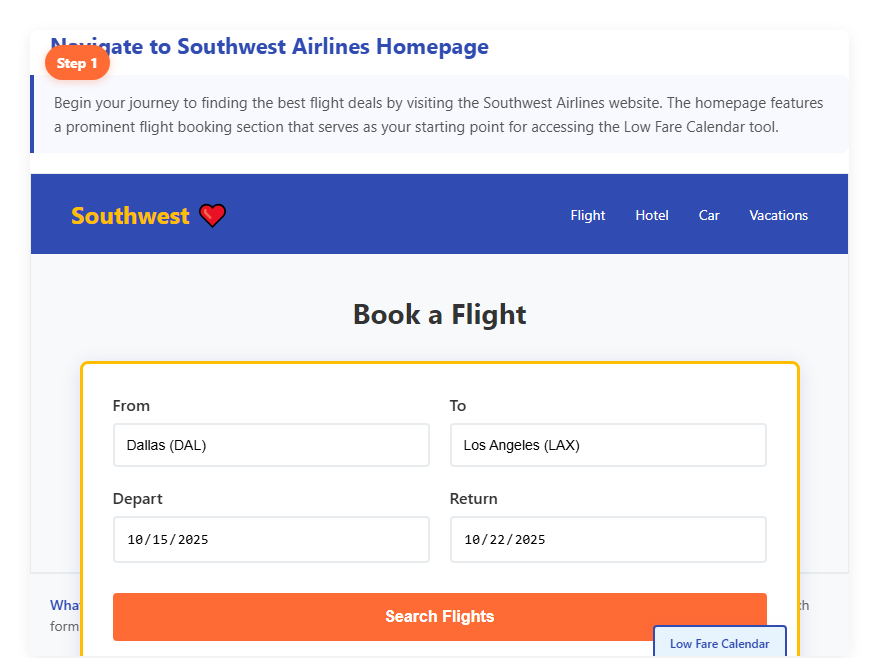
Step 1: Navigate to Southwest Airlines Homepage
- Visit the Southwest Airlines website.
- Look for the ‘Book a Flight‘ section on the homepage.
- This is your starting point for accessing the Low Fare Calendar.
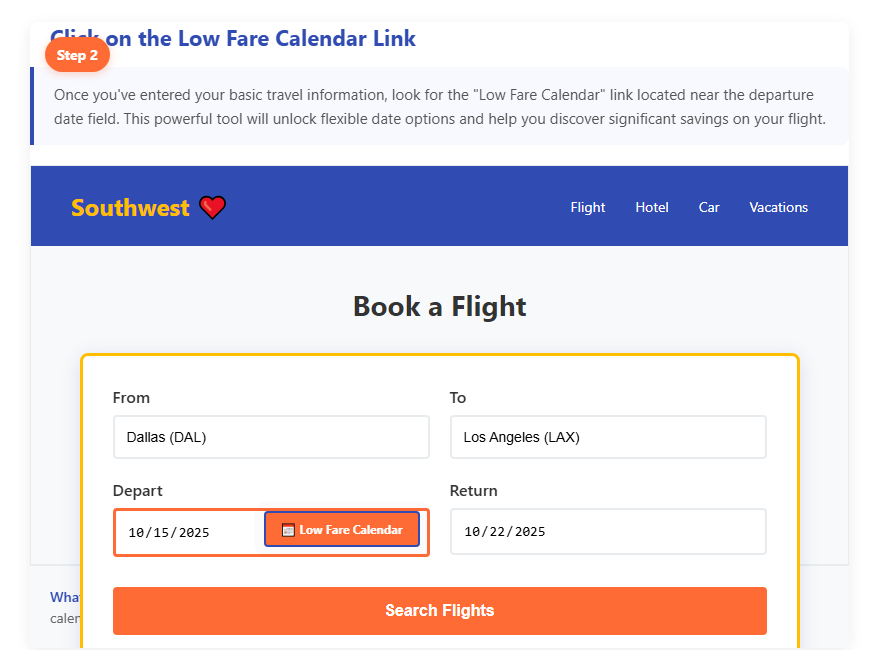
Step 2: Click on the Low Fare Calendar Link
- Look below the date fields on the flight search box.
- You’ll see a small text link that says “Low Fare Calendar.”
- Click it to open the calendar view and see the cheapest fares by date.
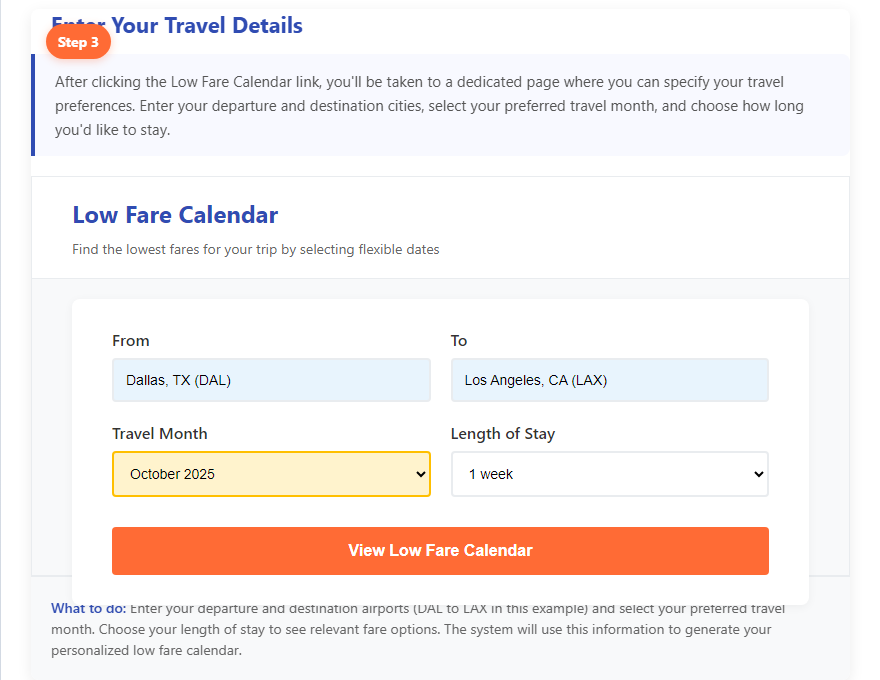
Step 3: Enter Your Travel Details
Type in your departure and arrival airports, choose one-way or round trip, and select the month you want to travel. Double-check everything, then hit Search to see the cheapest dates.
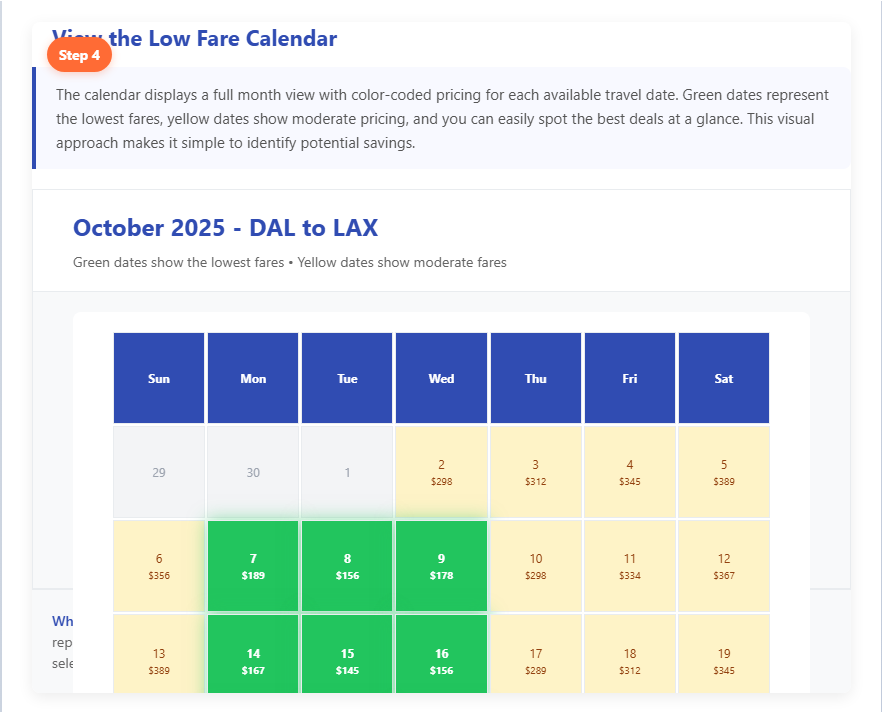
Step 4: View the Low Fare Calendar
- Once you hit search, the Low Fare Calendar loads instantly.
- Here you’ll see the lowest fares for each day of the month at a glance.
- Look for the green or bold prices – those are usually the cheapest deals.
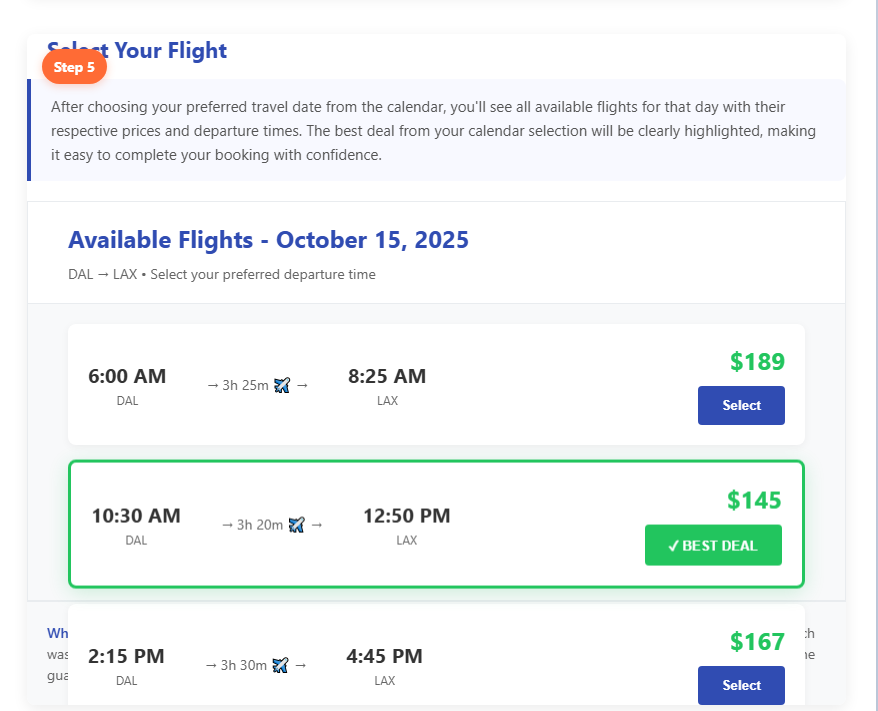
Step 5: Select Your Flight
Once you’ve spotted the lowest fare on the calendar, it’s time to lock in your flight. Click on the date you prefer, choose the exact flight time, and pick your fare type. This step ensures you get the best deal for your trip before moving to checkout.
How to Filter by Dates
- Go to the Southwest Airlines website or open the app.
- Enter where you’re flying from and where you’re flying to.
- Pick “Flexible Dates” or “Low Fare Calendar.”
- The calendar shows prices for each day in the month.
- Use the arrows to move between months and compare.
- Pick the days with the lowest fares that fit your trip.
How to Filter by Routes
- Start at Southwest.com or the Southwest app.
- Select if your trip is round-trip or one-way.
- Enter your departure and destination cities to set your route.
- Choose the Low Fare Calendar option on the search screen.
- Browse the calendar to see daily prices for that route.
- Adjust the month to explore different travel periods.
- Pick the lowest fare days, then check the total price.
Check also: Air France Flights with In-flight Entertainment
Southwest Low Fare Destinations
Looking for cheap Southwest flights? Southwest Airlines makes it easy with their Low Fare Calendar. You can see the cheapest days to fly for the whole month in one click. This helps you plan a trip that saves money without spending hours searching.
Popular Low-Fare Destinations
Here are some of the most common low-fare destinations on Southwest:
- Las Vegas (LAS): One of the cheapest Southwest routes from many U.S. cities.
- Orlando (MCO): Perfect for families heading to Disney or Universal.
- Chicago (MDW): Great for weekend getaways and often has low weekday fares.
- Denver (DEN): Affordable for mountain lovers and ski trips.
- Phoenix (PHX): Popular for warm-weather getaways in fall and winter.
- Los Angeles & San Diego: Cheap options for beach vacations.
- Tampa & Fort Myers: Great for Florida beach trips, especially in winter.
- Cancun (CUN): One of the most affordable international destinations Southwest flies to.
- Nashville (BNA): Budget-friendly flights for music lovers.
Best Day & Time of Week to Book Southwest Flights

If you want the best deal, aim for Tuesday afternoons. That’s when sales are live and prices often dip. The cheapest days to fly are usually Tuesdays, Wednesdays, and Saturdays.
Busy days like Fridays and Sundays cost more since everyone wants them. Booking one to three months ahead helps too, since prices climb closer to travel dates.
The good news? Southwest lets you rebook if fares drop, so you never miss savings. Keep an eye on flash sales, sign up for alerts, and book fast when you spot a good price. You’ll thank yourself later!
Weekday vs Weekend Price Comparison (Data Table)

Flying midweek usually saves you money, while weekends often cost more. If you stay flexible, you’ll spot cheaper days on the Southwest Low Fare Calendar. Here’s a quick look to make it easier:
| Day | Price Trend | Why It Matters |
| Tuesday | Cheapest to fly & book | Fewer travellers, new sales pop up |
| Wednesday | Cheap to fly | Lower demand midweek |
| Saturday | Often cheaper | Good for weekend trips |
| Friday | Expensive | Popular for getaways |
| Sunday | Expensive | High demand for returns |
Note: Book on Tuesday, fly on Tuesday, Wednesday, or Saturday, and skip Fridays and Sundays if you can.
How to Track Price Drops After Booking
Want to save even after you’ve booked? You can! Just keep an eye on prices with these simple tricks:
- Google Flights: Type in your cities, tap “Track prices,” and get email alerts when fares change.
- Kayak alerts: Set route alerts and let Kayak ping you if the price drops.
- Check your email: Watch for notifications so you don’t miss deals.
- Rebook if it’s cheaper: Found a lower fare? Change or cancel your ticket and grab the savings.
Tips to Save More with Southwest Low Fare Calendar + Sales
Want double savings? Here’s the trick: use Southwest’s sales and the Low Fare Calendar together.
First, sign up for emails so you know when sales drop. Then, open the calendar and search your route during those sale dates.
Look for the cheapest days, usually shown right on the calendar. Be flexible, because shifting your trip by a day or two can unlock big savings.
Once you see a good fare, book fast before it’s gone. If you choose a flexible fare type, you can even rebook later if prices drop again.
Rebooking for Cheaper Fares (Get Travel Credits Back)
Did you know you can rebook your Southwest flight if the price drops? Yep! Southwest even allows a Southwest fare drop refund/credit, which means you don’t lose money when fares fall. You can get credits back to use later. Here’s how it works:
Steps to Rebook:
- Log in and find your flight under Manage Reservation.
- Pick Change Flight and search for the same trip.
- If the price is lower, confirm the change.
- Southwest will give you travel credits or a refund (depending on your fare type).
The Travel Credits You Get Back
If prices drop later, you can rebook a Southwest flight at a cheaper fare and save the difference as credit. The type of credit you get depends on your fare.
Choice fares give you a Transferable Flight Credit™, while Basic fares only allow credits for the same traveler. Credits expire in 6–12 months, and you must rebook at least 10 minutes before departure.
Using Points + Low Fare Calendar for Maximum Value
You can stretch your Rapid Rewards points by pairing them with the Low Fare Calendar. Just log in to your Southwest account, search your route, and use the calendar to spot the cheapest days.
Fewer dollars usually means fewer points, so you’ll get more value when you book those dates. You can pay fully with points or mix points with cash using the Cash + Points option.
The trick is to stay flexible, shift your travel days to match the lower fares. This way, you get to fly for fewer points and keep some in your pocket for the next trip!
Southwest Low Fare Calendar vs Google Flights (Which is Better?)

Not sure which tool to use? Check it out here!
Southwest Low Fare Calendar
- What it does: Shows the cheapest days to fly on Southwest only.
- How it looks: A calendar with prices for each day of the month.
- Best for you if: You already want to fly Southwest and just need the lowest fare.
- Extra perk: Super simple to spot the cheapest days fast.
- When to use: Use this tool when you’re set on flying Southwest.
Google Flights
- What it does: Compares flights on lots of airlines, not just Southwest.
- Cool tools: Let’s you track prices, check flexible dates, and see tons of choices.
- Best for you if: You want to compare Southwest with other airlines before booking.
- Extra perk: Great for price alerts so you don’t miss a deal.
- When to use: Use it if you want to compare airlines and see who gives the best deal.
Pros & Cons (Southwest Low Fare Calendar vs Other Tools)
| Tool | Pros | Cons |
| Southwest Low Fare Calendar | Shows prices for a whole month at onceEasy to spot cheap travel daysGreat if you’re flexible with dates | Doesn’t update in real-timeNo price alerts Cheapest flights may have tricky timesOnly covers Southwest flights |
| Other Tools (Google Flights, Skyscanner, Hopper) | Compare many airlines at oncePrice alerts and tracking availableCan suggest the best time to bookWorks well for flexible routes | Can feel cluttered or complexAlerts may lag or miss changesSome small deals or airlines are not always shown |
Best Strategy for Families & Group Travel

Planning a trip with family or a big group can get expensive, but the Low Fare Calendar makes it easier to save money. It shows you the cheapest days to fly in a simple monthly view, so you can plan smarter.
By being a little flexible with dates, you can avoid peak times like weekends, holidays, or school breaks when fares are usually higher.
Instead, midweek days often bring lower prices. A good trick is to start by picking the cheapest days first, then plan the rest of your trip around them.
This way, families can save by using the calendar to book family flights cheap with Southwest without much hassle.
How to Split Group Bookings to Avoid Fare Hike?
Booking flights for a big group? Prices can jump fast. The trick is to split your bookings so you don’t end up paying more than you need. Here’s how you can do it:
- Book sure travelers together: Lock in seats for those who are 100% ready to fly.
- Keep undecided travelers separate: Make individual bookings for anyone who might change plans.
- Use self-service tools: Manage single bookings without messing up the whole group’s tickets.
- Ask to link reservations: Airlines can sometimes connect separate bookings, so you can still sit together.
Conclusion
And that’s the magic of the Southwest Low Fare Calendar. It keeps things simple, shows you the cheapest days at a glance, and helps you save without stress.
From flexible date planning to using points wisely, it’s the go-to tool for smarter travel. Families, groups, and solo flyers can all use it to spot the best deals, avoid fare hikes, and rebook if prices drop.
Pair it with sales or Rapid Rewards, and you’ll get even more value. Next time you plan a trip, let the calendar do the work, and you just enjoy picking the best price.
FAQs
The Southwest Low Fare Calendar is a monthly view tool that shows the cheapest available fares for each day, helping travelers pick the most affordable dates quickly.
Southwest typically releases fares 6–8 months ahead. As of now, flights are available through November 1, 2025, with new dates being added in batches every few months.
Yes, the calendar includes Southwest’s international destinations, including Mexico, the Caribbean, and Central America.
Yes. Log into your account, choose “Points” instead of “Dollars”, and you can see how many points each flight costs on the calendar.
Tuesdays, Wednesdays, and Saturdays are usually the cheapest days to fly Southwest, while Fridays and Sundays tend to be the most expensive.
The best time is usually Tuesday afternoon when sales launch, and booking 1–3 months in advance often gives the best fares.
Yes! Southwest allows free flight changes. If your fare drops, rebook online, and you’ll receive the difference as travel credits or a refund (depending on your fare type).

